

1Récupérer les éléments
- Créer un dossier « logo » dans le dossier « images » présent dans le dossier « site«
- Transférer les deux éléments à récupérer (clic droit enregistrer la cible du lien sous…) dans le dossier « logo«
- Grand logo – Petit Logo
2Manipulation
Dans Notepad++
index_ALL.html > ligne 41 > Définir un contenant pour recevoir le logo
Insérer le code <div id="logo"></div>
Dans monstyle.css
ligne 12 > Insérer le code suivant
#logo {
width: 86px;
height: 90px;
background-image: url('../images/logo/brandx_logo-petit.png');
background-position: center center;
background-repeat: no-repeat;
margin: 0 auto 1em;
}
> Défini le logo présent sur tous les terminaux.
ligne 55 > Insérer le code suivant
@media (min-width: 801px) {
#logo {
width: 234px;
height: 100px;
background-image: url('../images/logo/brandx_logo.png');
background-position: center center;
background-repeat: no-repeat;
margin: 0 auto 1em;
}
}
> Défini le logo présent sur tous les terminaux dont la résolution sera de 801 pixels minimum de large.
(Théoriquement – à 800 pixels de large, se reporter à ce qui est défini ligne 12.)
3Une icône
Se rendre sur le site de Font Awesome (version 4.7)
La page des icônes – l’icône utilisée pour l’exemple
Le code utilisé pour l’exemple > <i class="fa fa-arrow-circle-up" aria-hidden="true"></i>
Le code final pour l’exemple >
<i class="fa fa-arrow-circle-up fa-4x" aria-hidden="true"></i>
Manipulation
- Dans Notepad++ > index-ALL.html
- A partir de la ligne 62 > Repérer les 3 balises
<article>
Ce qui est
<article class="four columns magenta">
<p>Ici un service/un produit mis en avant.</p>
</article>
Devient
<article class="four columns magenta">
<p><i class="fa fa-arrow-circle-up fa-4x" aria-hidden="true"></i></p>
<p>Ici un service/un produit mis en avant.</p>
</article>
4Le code de cette étape
HTML
   <!-- ENTETE -->
	<div class="row">
		<header class="twelve columns vert">
		<div id="logo"></div>
		<div class="topnav" id="myTopnav">
		  <a href="#home">Accueil</a>
		  <a href="#page01">Page 01</a>
		  <a href="#page02">Page 02</a>
		  <a href="#page03">Page 03</a>
		  <a href="javascript:void(0);" class="icon" onclick="myFunction()">
		    <i class="fa fa-bars"></i>
		  </a>
		</div>
		</header>
    <!-- /ENTETE -->
    <!-- ACCUEIL ligne 2 -->
	<div class="row">
		<article class="four columns magenta">
		<p><i class="fa fa-arrow-circle-up fa-4x" aria-hidden="true"></i></p>
		<p>Ici un service/un produit mis en avant.</p>
		</article>
		<article class="four columns magenta">
		<p><i class="fa fa-arrow-circle-up fa-4x" aria-hidden="true"></i></p>
		<p>Ici un service/un produit mis en avant.</p>
		</article>
		<article class="four columns magenta">
		<p><i class="fa fa-arrow-circle-up fa-4x" aria-hidden="true"></i></p>
		<p>Ici un service/un produit mis en avant.</p>
		</article>
	<!-- /ACCUEIL ligne 2 -->
CSS
@import url('https://fonts.googleapis.com/css?family=Oswald|Source+Sans+Pro:300,400,600');
/*
font-family: 'Source Sans Pro', sans-serif;
font-family: 'Oswald', sans-serif;
*/
body {
font-family: 'Source Sans Pro', "Helvetica Neue", Arial, Helvetica, Geneva, sans-serif;
}
h1, h2, h3, h4, h5, h6 {
font-family: 'Oswald', "Lucida Grande", Lucida, Verdana, sans-serif;
}
#logo {
width: 86px;
height: 90px;
background-image: url('../images/logo/brandx_logo-petit.png');
background-position: center center;
background-repeat: no-repeat;
margin: 0 auto 1em;
}
 /* Add a black background color to the top navigation */
.topnav {
  background-color: #333;
  overflow: hidden;
}

/* Style the links inside the navigation bar */
.topnav a {
  float: left;
  display: block;
  color: #f2f2f2;
  text-align: center;
  padding: 14px 16px;
  text-decoration: none;
  font-size: 17px;
}

/* Change the color of links on hover */
.topnav a:hover {
  background-color: #ddd;
  color: black;
}

/* Add an active class to highlight the current page */
.active {
  background-color: #4CAF50;
  color: white;
}

/* Hide the link that should open and close the topnav on small screens */
.topnav .icon {
  display: none;
}

@media (min-width: 801px) {
#logo {
width: 234px;
height: 100px;
background-image: url('../images/logo/brandx_logo.png');
background-position: center center;
background-repeat: no-repeat;
margin: 0 auto 1em;
}
}

@media (min-width: 550px) {

.bureauGauche {
margin-left: 0;
}
.bureauDroit {
float: right;
}
/*.bureauDroit {
position: absolute;
right: 0;
}*/
.imgGauche {
float:  left;
margin-right: 4%;
}
.imgDroit {
float:  right;
margin-left: 4%;
}
.imgCentre {
text-align: center;
}
.imgBandeau {
width: 100%;
height: 400px;
background-image: url('../images/imgDemo01.jpg');
background-position: center center;
background-repeat: no-repeat;
background-size: cover;
}

}

 /* When the screen is less than 800 pixels wide, hide all links, except for the first one ("Home"). Show the link that contains should open and close the topnav (.icon) */
@media screen and (max-width: 800px) {
  .topnav a:not(:first-child) {display: none;}
  .topnav a.icon {
    float: right;
    display: block;
  }
}

/* The "responsive" class is added to the topnav with JavaScript when the user clicks on the icon. This class makes the topnav look good on small screens (display the links vertically instead of horizontally) */
@media screen and (max-width: 800px) {
  .topnav.responsive {position: relative;}
  .topnav.responsive a.icon {
    position: absolute;
    right: 0;
    top: 0;
  }
  .topnav.responsive a {
    float: none;
    display: block;
    text-align: left;
  }
}5Observation
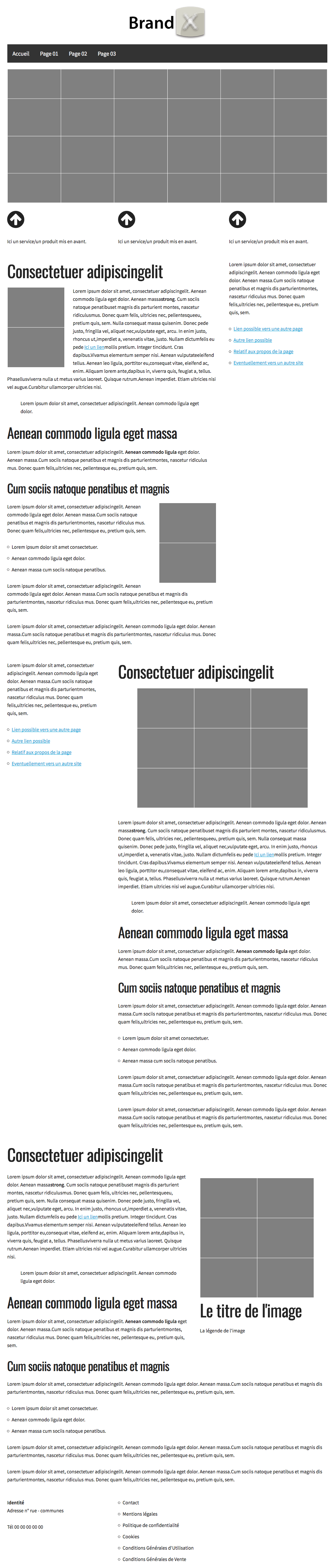
Version bureau
6Observation

(Dans Firefox > Le menu « Hamburger » haut droit du navigateur > Développement web > Vue adaptive > Fixer la largeur à 800px)